
When you send fine jewelry by courier, critical operational questions arise every single day: How many parcels went out this week? Which logistics carriers are handling our deliveries? Which shipments have been verified by the recipient, and which are still in transit? And most importantly, what is the total precious metal weight and financial value currently on the road? Answering those questions used to require opening individual sales invoices and delivery challans one by one. SocioLedger’s new Courier Delivery Report consolidates your entire dispatch pipeline into a unified, actionable tracking dashboard.
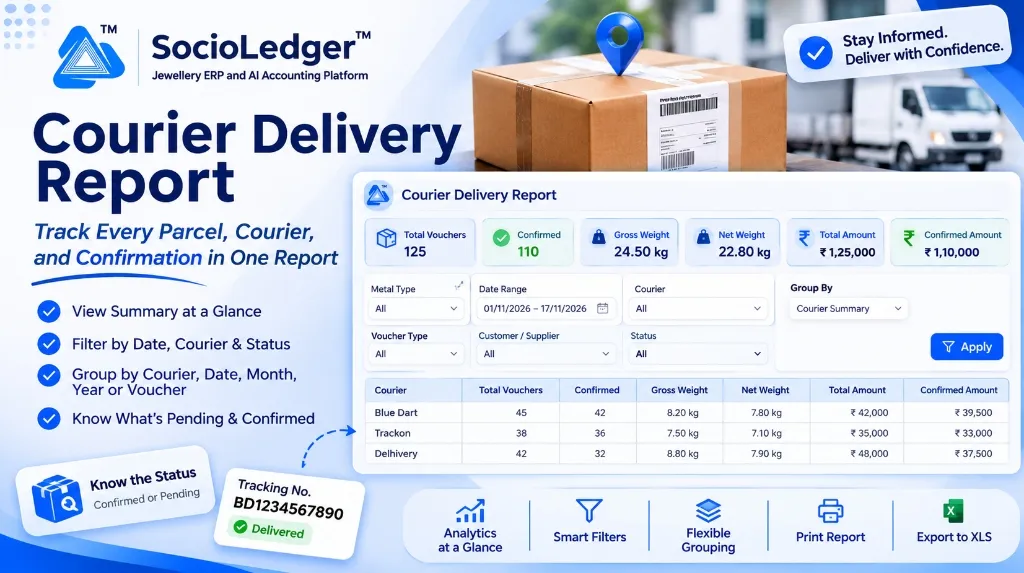
Table of contents
Open Table of contents
- The blind spot in high-value jewelry parcel logistics
- What’s new: The Courier Delivery Report dashboard
- Multi-dimensional filtering to isolate shipments
- Flexible grouping: Big picture to granular line items
- Integrated productivity tools
- Why this matters for jewelry businesses
- Feature comparison
- How it works: Step-by-step guide
- Where to find the report
- Part of SocioLedger’s jewelry logistics ecosystem
- Every parcel accounted for, every shipment verified
The blind spot in high-value jewelry parcel logistics
In active manufacturing and wholesale trading centers like Surat, Zaveri Bazaar in Mumbai, Rajkot, and Karol Bagh in Delhi, dispatching high-value jewelry consignments via insured courier agencies is part of daily business. Packages contain gold necklaces, diamond-studded bridal sets, bullion coins, or loose precious gemstones.
While dispatch clerks routinely enter carrier names and docket numbers when issuing challans, tracking the lifecycle of those shipments across the month typically creates severe operational friction:
- Scattered parcel records: Tracking data stays isolated inside individual sales vouchers or delivery challans, making aggregate logistics reporting nearly impossible.
- Unmonitored in-transit exposure: Showroom owners and accounts heads cannot easily view the combined gold weight or rupee valuation currently moving across transit routes.
- Pending confirmation ambiguity: Without a centralized view, spotting deliveries that have stalled or missed their expected delivery windows requires manually checking courier tracking portals one parcel at a time.
- Carrier volume blindness: Evaluating whether courier agencies like Blue Dart, Trackon, Sequel, or Delhivery are meeting their commitments or comparing shipment volumes across carriers requires tedious manual calculation.
A jewelry business needs total logistics clarity — uniting dispatched parcel quantities, precious weights, carrier allocations, and verified delivery receipts in a single report.
What’s new: The Courier Delivery Report dashboard
The Courier Delivery Report provides a comprehensive auditing and tracking view of every voucher delivery handled by an external courier service. It monitors dispatched parcels, delivery status, weight verification, and recipient confirmation metrics across your organization.
+---------------------------------------------------------------------------------------------------------------+
|  Courier Delivery Report                                                                                      |
+---------------------------------------------------------------------------------------------------------------+
|  [📦] Total Vouchers  |  [✓] Confirmed  |  [⚖] Gross Weight  |  [⚖] Net Weight  |  [₹] Total Amount  |  [₹] Confirmed |
|       125             |      110        |      24.50 kg      |      22.80 kg    |      ₹ 1,25,000    |      ₹ 1,10,000|
+---------------------------------------------------------------------------------------------------------------+
Executive KPI summary cards
At the top of the report, six live metric cards present an immediate snapshot of your filtered selection:
- Total Vouchers: The total count of parcel shipments dispatched within the chosen timeframe.
- Confirmed: How many parcels have reached their destination and been formally verified.
- Gross Weight & Net Weight: Cumulative precious metal weights currently handled or settled through logistics partners.
- Total Amount: The aggregate invoice and consignment value of all filtered shipments.
- Confirmed Amount: The precise financial value of deliveries successfully completed and signed off.
Granular voucher breakdown
Beneath the KPI cards, the report details each shipment with essential operational attributes:
- Voucher Number & Type: Sales invoice, delivery challan, or branch stock transfer.
- Airway Bill Tracking Number: Displayed prominently directly below the voucher reference for instant carrier lookup.
- Customer / Supplier Name: The sending or receiving counterparty.
- Quantities & Weights: Total piece count, gross weight, less-item weight deductions, and net metal weight.
- Status & Delivery Confirmation: Clear visual tags denoting Pending or Confirmed, complete with the exact timestamp of delivery confirmation.
- Operator Attribution: The team member who created and dispatched the parcel.
Multi-dimensional filtering to isolate shipments
The Courier Delivery Report features powerful filters to help you zero in on specific delivery segments in seconds:
+---------------------------------------------------------------------------------------+
|  FILTERS                                                                              |
|  Metal Type: [ All Metals   v ]     Date Range: [ 01/11/2026 – 17/11/2026  📅 ]       |
|  Courier   : [ All Carriers v ]     Group By  : [ Courier Summary          v ]        |
|  Voucher   : [ All Types    v ]     Customer  : [ All Parties              v ]        |
|  Status    : [ All          v ]                                         [ Apply ]     |
+---------------------------------------------------------------------------------------+- Metal Type: Filter by Gold, Silver, Platinum, or view all metal categories simultaneously.
- Date Range: Inspect daily dispatches, weekly delivery schedules, or monthly audit intervals.
- Courier Partner: Focus on specific logistics carriers such as Blue Dart, Trackon, Delhivery, BVC, or Sequel.
- Voucher Type: Isolate commercial sales invoices, outward approval challans, or inter-branch transfers.
- Customer / Supplier: Track all shipments routed to a particular retail client or wholesale stockist.
- Delivery Status: Separate open shipments currently pending in transit from verified, delivered consignments.
Flexible grouping: Big picture to granular line items
Different management tasks require different data structures. The Group By selector rearranges the entire dataset on demand:
- Courier Summary: Condenses the report into one summary row per logistics provider, comparing total parcels, confirmed deliveries, gross weight, net weight, and total billing value side by side.
- Date, Month, or Year: Groups shipments chronologically to evaluate seasonal shipping volume trends, holiday peaks (e.g., Diwali or Dhanteras), and month-on-month carrier demand.
- Voucher Details: Expands every consignment into an individual row for exhaustive audits, reconciliations, and dispute investigations.
+-------------------------------------------------------------------------------------------------------------+
|  COURIER SUMMARY GROUPING                                                                                   |
+-------------------------------------------------------------------------------------------------------------+
|  Courier    | Total Vouchers | Confirmed | Gross Weight | Net Weight | Total Amount (₹) | Confirmed Amount (₹)|
|-------------|----------------|-----------|--------------|------------|------------------|---------------------|
|  Blue Dart  | 45             | 42        | 8.20 kg      | 7.80 kg    | 42,000.00        | 39,500.00           |
|  Trackon    | 38             | 36        | 7.50 kg      | 7.10 kg    | 35,000.00        | 33,000.00           |
|  Delhivery  | 42             | 32        | 8.80 kg      | 7.90 kg    | 48,000.00        | 37,500.00           |
+-------------------------------------------------------------------------------------------------------------+
Integrated productivity tools
To streamline daily logistics audits and team collaboration, the Courier Delivery Report includes dedicated workflow tools:
- Show Analytics: Generates interactive visual breakdowns of courier distribution shares and delivery completion rates.
- Saved Presets: Save complex filter configurations (e.g., “Pending Blue Dart High-Value Shipments”) and reload them with a single click.
- Print Layout: Generates clean, printer-ready audit sheets for showroom binders and dispatch counters.
- Export to XLS: Downloads the complete structured dataset into Excel for external courier freight auditing, insurance compliance, or CA reviews.
Why this matters for jewelry businesses
Consolidating courier logistics into a dedicated report delivers immediate operational safeguards:
- Single source of truth: Review every outward parcel without clicking through dozens of sales screens.
- Pinpoint pending shipments: Spot delayed or unconfirmed high-value consignments before customers need to call.
- Objective courier evaluation: Compare delivery success rates and tonnage across different courier partners to negotiate better commercial rates.
- Instant transit risk assessment: View live gross weight and total rupee exposure on the road at any given moment.
- Rapid tracking retrieval: Airway bill docket codes are paired directly with invoice numbers for quick phone support.
- Seamless data sharing: Export schedules to Excel or print copies for chartered accountants and transit insurance underwriters.
Feature comparison
| Logistics Dimension | Disconnected Voucher Lookups | SocioLedger Courier Delivery Report |
|---|---|---|
| Shipment Overview | Scattered across individual vouchers | Consolidated dashboard with 6 live KPI cards |
| In-Transit Valuation | Manual spreadsheet calculation required | Automatic live Total Amount & Confirmed Amount |
| Weight Tracking | Individual gross and net weight tallies | Aggregate Gross and Net kilograms calculated live |
| Carrier Comparison | No comparative analytics | 1-click Courier Summary grouping across carriers |
| Status Monitoring | Manual verification on courier websites | Instant visual Pending vs. Confirmed status tags |
| Reporting & Export | Manual copy-pasting into Excel | 1-click Export to XLS, Print, and Saved Presets |
How it works: Step-by-step guide
Generating and acting on your courier delivery metrics takes only a few steps:
- Open the Report: Navigate to Reports in the main navigation menu and select Courier Delivery Report.
- Apply Your Filters: Select the desired date range, metal type, courier agency, voucher classification, or delivery status.
- Choose Grouping: Set Group By to Courier Summary for a macro carrier comparison, or Voucher Details for individual parcel tracking.
- Click Apply: The KPI summary cards and data table refresh instantly.
- Inspect or Open Vouchers: Click on any voucher number to drill down directly into the full sales or challan document.
- Print or Export: Use Export XLS to download the ledger or Print for dispatch desk records.
Where to find the report
- Go to Reports → Courier Delivery Report.
The report is available to all team members with authorized reporting privileges across configured retail showrooms, wholesale desks, and manufacturing centers.
Part of SocioLedger’s jewelry logistics ecosystem
The Courier Delivery Report works in harmony with SocioLedger’s specialized logistics, dispatch, and accounting tools:
- Physical delivery verification: Capture weight checks and parcel photos with Delivery Challan Courier Confirmation.
- Printed tracking credentials: Print courier names and tracking numbers on customer paperwork using Print Courier Details.
- Automated parcel labels: Format standardized courier stickers with Parcel Confirmation Courier Label.
- Activity log shortcuts: Trace dispatch modifications on the timeline with Activity Logs Edit Shortcut.
- Tailored ledger views: Choose your preferred index summary using Ledger Report Index Layouts.
Every parcel accounted for, every shipment verified
Jewelry shipments represent significant capital, operational effort, and customer trust. When valuable gold and diamond parcels move between workshops, showrooms, and customer doorsteps, owners cannot afford logistics blind spots.
With SocioLedger’s Courier Delivery Report, jewelers gain complete visibility over every parcel in transit — tracking carriers, confirming deliveries, and protecting precious inventory from dispatch to final delivery.
Want another metric, carrier integration, or custom filter added to your logistics reports? Tell us — contact our team and our team will be delighted to support your workflow.