
Every customer and supplier you work with has a ledger, and every ledger holds essential details: a phone number, a contact person, an address, GST and PAN numbers, a date of birth, and TDS or TCS settings. When you need those details for many parties at once — whether for a follow-up campaign, a tax check, or sharing a list with your accountant — opening each ledger one by one is slow and frustrating. The new Customer Detail Report in SocioLedger puts all of your counter and workshop contacts into a single, comprehensive directory.
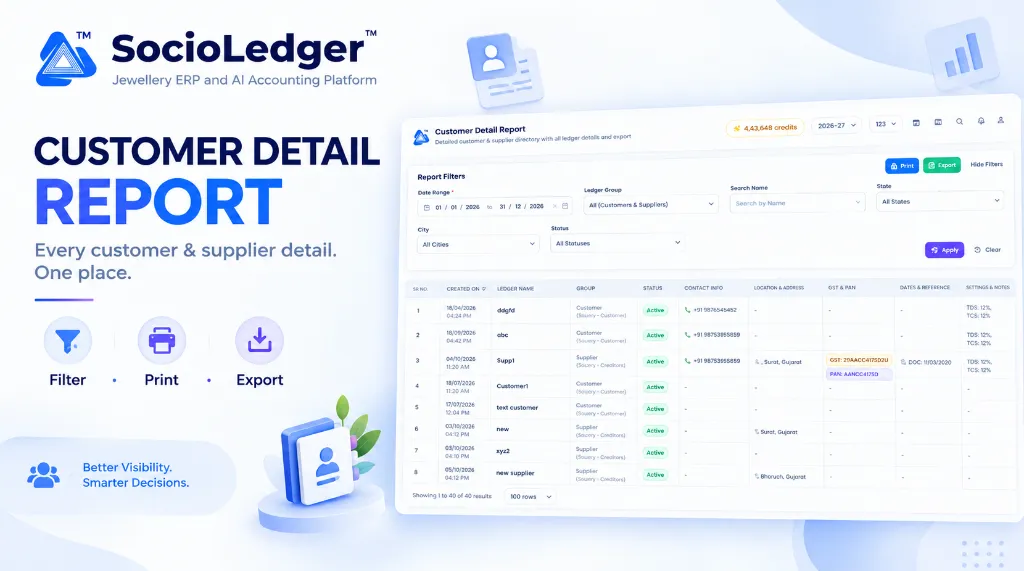
Table of contents
Open Table of contents
- The friction of scattered customer and supplier data
- What’s new: Complete customer and supplier directory in one view
- Filter to find exactly who you need in seconds
- Print or export for accounting, audits, and marketing
- Why this matters for jewelry businesses
- Comparison: Traditional ledger lookups vs. SocioLedger Customer Detail Report
- How it works: Step-by-step guide
- Where to find the Customer Detail Report
- Part of SocioLedger’s integrated jewelry management suite
- A complete directory, always up to date
The friction of scattered customer and supplier data
In active jewelry wholesale and retail hubs like Zaveri Bazaar in Mumbai, Surat’s bullion market, Rajkot’s manufacturing clusters, and Karol Bagh in Delhi, jewelry businesses manage relationships with hundreds of retail buyers, corporate clients, artisan karigars, and bullion suppliers. Each party requires an individual ledger to record purchases, metal issues, payments, and balances.
Over months and years of trading, those ledgers accumulate critical operational information:
- Identity and contact details: Primary mobile numbers, alternative phone lines, and authorized contact persons.
- Tax and statutory records: GSTIN identifiers, PAN numbers, state codes, and city jurisdictions.
- Relationship milestones: Client birth dates and wedding anniversaries used for personalized showroom outreach.
- Compliance settings: Specific TDS and TCS percentage flags required for statutory filings.
However, when this information remains locked inside separate ledger edit screens, retrieving it in bulk becomes a bottleneck:
- Tedious one-by-one lookups: Finding phone numbers or addresses for twenty outstation clients requires clicking into twenty separate records.
- Slow tax verification before audits: Checking whether all high-value buyers or suppliers have valid GSTIN and PAN numbers logged takes hours of manual navigation.
- Missed marketing opportunities: Planning festive greetings or promotion broadcasts for Dhanteras, Diwali, or Akshaya Tritiya is difficult when customer birthdays and locations cannot be viewed in one filtered list.
- Cumbersome accountant handoffs: When external chartered accountants ask for an updated list of sundry debtors and sundry creditors with their tax numbers, pulling that data manually is exhausting.
Your jewelry software should give you an instant, high-altitude view of everyone you do business with without forcing you to click into individual ledgers.
+-----------------------------------------------------------------------------+
|               Traditional Manual Ledger Lookup Workflow                     |
+-----------------------------------------------------------------------------+
|                                                                             |
|   Need Party Details (Phone, Address, GST, DOB, Tax Settings)               |
|            │                                                                |
|            ├──► Open Customer 1 Ledger ──► Check Details ──► Close          |
|            ├──► Open Customer 2 Ledger ──► Check Details ──► Close          |
|            ├──► Open Supplier 1 Ledger ──► Check Details ──► Close          |
|            └──► Open Supplier 2 Ledger ──► Check Details ──► Close          |
|                                                                             |
|   Result: Dozens of screen changes, lost time, no batch export or print     |
+-----------------------------------------------------------------------------+
|               SocioLedger Unified Customer Detail Report                    |
+-----------------------------------------------------------------------------+
|                                                                             |
|   Reports ──► Customer Detail Report                                        |
|            │                                                                |
|            ├── Single filterable table (Name, Group, City, State, Status)   |
|            ├── All details visible (Contact, GST, PAN, DOB, TDS, TCS)       |
|            └── 1-Click Print or Export directly to Excel / CSV              |
|                                                                             |
|   Result: Complete directory visibility in seconds                          |
+-----------------------------------------------------------------------------+
What’s new: Complete customer and supplier directory in one view
The Customer Detail Report is a detailed customer and supplier directory that consolidates the operational and statutory information already recorded across your ledgers.
Instead of navigating between separate debtor and creditor screens, the report brings all accounts into a clean, responsive table. For each party, the report displays:
- Created On: The exact creation date and timestamp showing when the ledger was opened, making it simple to track client relationship seniority.
- Ledger Name: The full business or personal account name, clearly displaying a Private badge whenever a ledger is marked confidential.
- Group: Clear categorization identifying whether the account belongs to Customer (Sundry Debtors) or Supplier (Sundry Creditors).
- Status: An active or inactive status tag indicating whether the account is currently enabled for trading.
- Contact Info: The primary phone number formatted with international country flags for rapid dialling or messaging.
- Contact Person: The designated contact person at the firm along with their direct mobile contact.
- Location & Address: The registered city and state, allowing quick geographic segmentation across trading zones.
- GST & PAN: Color-coded statutory badges displaying registered GSTIN and PAN numbers for fast compliance verification.
- Dates & Reference: Important milestone records such as dates of birth (DOB) and reference details.
- Settings & Notes: Critical accounting rules such as preset TDS percentages, TCS collection rates, and operational notes.
Every piece of data reflects the live details saved inside your existing ledgers, giving you immediate visibility without duplicate data entry.
Filter to find exactly who you need in seconds
A comprehensive directory is only useful if you can segment it quickly. The Customer Detail Report includes a powerful, multi-parameter filter bar designed for fast lookups:
- Date Range: Choose specific opening periods to see new accounts created during a particular month, quarter, or financial year.
- Ledger Group: View all parties together, or filter specifically by Customers (Sundry Debtors) or Suppliers (Sundry Creditors).
- Search Name: Locate any specific individual, firm, or karigar instantly by typing their account name.
- State and City: Narrow down records to pinpoint parties in specific regional markets like Surat, Mumbai, Ahmedabad, or Jaipur.
- Status: Filter between active accounts, inactive accounts, or review all statuses simultaneously.
Once you set your parameters, click Apply to refresh the directory in real time, or click Clear to reset your filters back to defaults. You can also click Hide Filters at any time to collapse the filter drawer and maximize screen space for the data table.
Print or export for accounting, audits, and marketing
Once you have filtered the directory to display the exact group of parties you need, taking that data out of the system is instantaneous:
- Print: Click Print to produce a clean, printer-ready directory copy for front-desk binders, credit reviews, or counter reference.
- Export: Click Export to download the structured report directly into a spreadsheet format (Excel or CSV).
Exporting makes it effortless to share customer and vendor listings with your chartered accountant during quarterly audit reviews, share supplier lists with purchase teams, or upload customer phone lists to messaging platforms for festive campaign announcements.
Why this matters for jewelry businesses
Consolidating your customer and supplier master records into a single filterable report delivers measurable advantages for daily jewelry operations:
- Everything in one place: Customer retail buyers, wholesale clients, bullion dealers, and workshop karigars are accessible from a unified directory.
- Instant demographic segmentation: Filter parties by state, city, or ledger group to coordinate regional sales trips or dispatch schedules.
- Fast statutory compliance reviews: Verify missing GST or PAN registrations across hundreds of accounts in minutes rather than discovering missing details right when generating an invoice.
- Targeted festival and birthday outreach: Keep milestone dates such as birthdays and anniversaries visible in one view to plan timely promotional greetings before Dhanteras and wedding seasons.
- Effortless accountant collaboration: Generate and export comprehensive sundry debtor and creditor schedules whenever your audit team requires them.
- Single source of truth: The report directly mirrors your active ledgers, ensuring your directory remains 100% synchronized with your accounting books at all times.
Comparison: Traditional ledger lookups vs. SocioLedger Customer Detail Report
| Feature / Capability | Traditional Ledger Lookups | SocioLedger Customer Detail Report |
|---|---|---|
| Directory Scope | Fragmented across individual debtor and creditor lists | Unified directory for all customers and suppliers |
| Lookup Speed | Minutes per party opening separate screens | Instantaneous filterable table in seconds |
| Tax Details (GST & PAN) | Hidden inside individual ledger settings | Highlighted side-by-side with statutory tags |
| Tax Settings (TDS & TCS) | Requires editing each master ledger to verify | Displayed directly in the report table |
| Geographic Filtering | Manual mental sorting or custom queries | Instant 1-click filter by State and City |
| Milestone Dates | Buried inside ledger reference tabs | Visible DOB and reference date columns |
| Private Account Flag | Easy to overlook during routine reviews | Distinct visual Private tag on confidential accounts |
| Export Capabilities | Manual copy-pasting or complex database scripts | 1-click Export to spreadsheet formats |
| Print-Ready Format | Cluttered screen printouts | Clean, formatted printer-friendly layout |
How it works: Step-by-step guide
Accessing and generating your customer and supplier directory in SocioLedger requires only a few clicks:
- Open the report: Navigate to Reports in the main menu and select Customer Detail Report.
- Set your filters: Select the desired date range, choose your ledger group, enter a search term, or specify a state and city.
- Apply filter criteria: Click the Apply button to display matching customers and suppliers in the table.
- Inspect records: Review contact information, addresses, tax registration tags, milestone dates, and tax settings across the columns.
- Print or export: Click Print for a physical document or Export to download the full dataset for external use.
Where to find the Customer Detail Report
The Customer Detail Report is available directly in the platform’s standard navigation:
- Go to Reports → Customer Detail Report.
Every user with authorized reporting permissions can immediately access, filter, and export the directory across all configured branches.
Part of SocioLedger’s integrated jewelry management suite
The Customer Detail Report works hand-in-hand with SocioLedger’s comprehensive suite of tools built for modern jewelry showrooms and manufacturers:
- Targeted ledger searches: Find accounts on the fly with the Ledger Search Field-Wise Filter.
- Audit ledger activity: Inspect historical transactions and balance trends using the Ledger History Panel.
- Tamper-proof accounting: Safeguard past financial entries from unintended modifications with Lock Ledger Period.
- Fine item assignments: Tailor purity handling per client or vendor using Ledger-Wise Fine Item Setting.
- Direct payment collections: Collect instant invoice settlements on the counter with Secure UPI Checkout.
A complete directory, always up to date
Your ledgers already hold the valuable contact, statutory, and relationship details of everyone you do business with. In a fast-paced jewelry business, you shouldn’t have to waste time hunting through individual records just to find a phone number, confirm a GST number, or export a vendor list for your accountant.
With SocioLedger’s Customer Detail Report, jewelry businesses gain a unified, filterable directory that makes party details instantly accessible, easy to audit, and ready to print or export at a moment’s notice.
Want another detail or custom column added to this report? Tell us — contact our team and we will be happy to help tailor your reports to your exact operational workflow.