
SocioLedger now includes a dedicated Notes field across the Lead, Ledger, and User modules, giving jewelry businesses a centralized place to capture nuanced details that don’t fit into standard form fields. In the daily rhythm of running retail showrooms, wholesale counters, and manufacturing workshops, some of the most critical operational context — a bride’s specific design preference, a bullion supplier’s agreed credit cycle, or a team member’s shift availability — is unstructured. Instead of relying on scattered paper sticky notes or mental memory, your team can now record and preserve rich context directly attached to the relevant record.
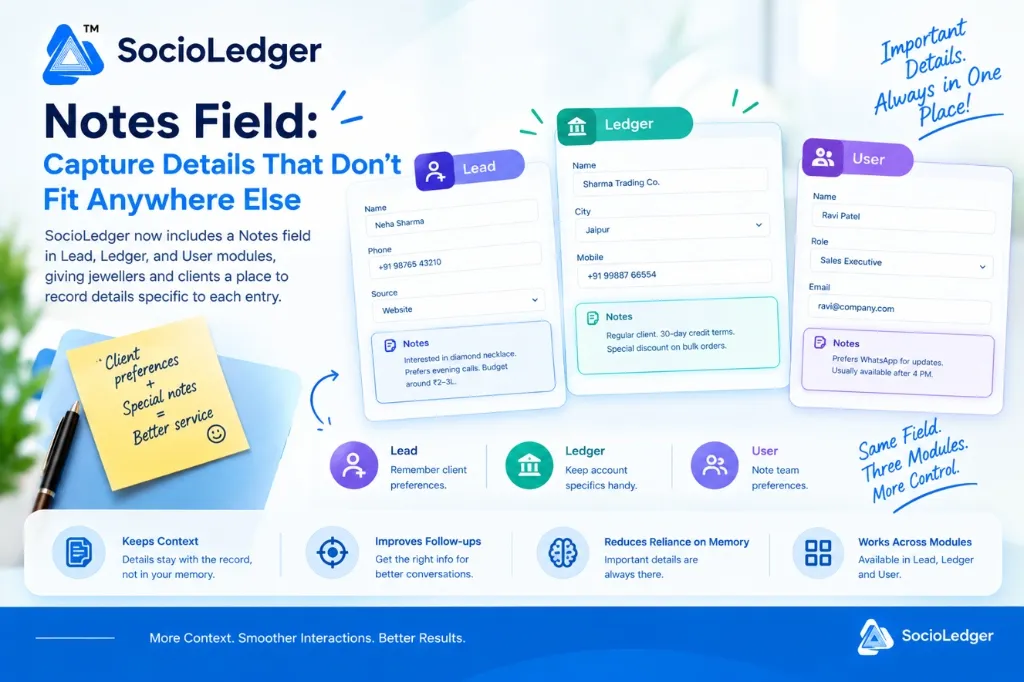
Table of contents
Open Table of contents
- Why unstructured context matters in jewelry operations
- The hidden cost of scattered notes and memory-based workflows
- One simple field across three vital modules
- How to use the Notes field in SocioLedger
- Structured fields vs. Free-form Notes in SocioLedger
- Measurable benefits for your jewelry business
- A small field that delivers big context
Why unstructured context matters in jewelry operations
In high-value jewelry markets like Zaveri Bazaar, Surat, Karol Bagh, and Manek Chowk, business runs on relationships, trust, and precise personal attention. While structured fields like customer name, phone number, GSTIN, city, and account balance track the core transaction data, they cannot capture the human nuances that make or break a client relationship.
During a routine counter interaction or a phone consultation, clients and trade partners share valuable background:
- A walk-in buyer mentions they are shopping for their daughter’s December wedding and love antique choker designs.
- A wholesale buyer requests dispatch notifications sent only to a specific partner on WhatsApp.
- A trusted bullion dealer agrees to an extended 30-day payment cycle for bulk festive orders.
- A senior sales consultant handles custom Polki inquiries and is best reached in the late afternoon.
When software forces every piece of data into rigid dropdowns or fixed checkboxes, these crucial details get left behind. Staff either write them on loose desk notepads, send them in unsearchable chat groups, or try to remember them. When details stay in people’s heads, context disappears the moment a staff member takes leave or shifts counters.
A flexible Notes field bridges the gap between rigid database structures and real-world jewelry commerce.
The hidden cost of scattered notes and memory-based workflows
Relying on informal notes and memory creates friction across every department of a jewelry enterprise:
1. Inconsistent customer follow-ups and lost sales
When a sales executive follows up with an exhibition lead or bridal inquiry without knowing their earlier preferences, the conversation feels cold and repetitive. Asking a high-net-worth client to re-explain their budget or design preference creates friction and weakens buyer confidence.
2. Commercial misunderstandings and accounting disputes
Wholesale transactions and job-work arrangements frequently involve custom terms — special volume discounts, specific courier preferences, or custom billing schedules. If these terms are not visible on the party’s ledger profile, billing operators may issue standard invoices, causing awkward billing disputes during reconciliations.
3. Disjointed internal handovers between team members
In multi-branch showrooms and busy wholesale operations, multiple team members interact with the same client or vendor. Without a shared note attached to the profile, shift changes and task handovers lead to duplicate calls, conflicting promises, and operational confusion.
Keeping notes directly on the profile ensures that anyone opening the record has complete context in seconds.
One simple field across three vital modules
SocioLedger introduces the Notes field across three core modules — Lead, Ledger, and User — giving your team immediate context across customer acquisition, accounting masters, and internal team management.
1. Lead module: Personalize buyer preferences and close sales faster
In jewelry sales, converting an inquiry into a high-value sale requires understanding buyer intent. The Notes field in the Lead module lets sales teams log specific customer desires immediately after an interaction:
- Specific design interests: Log notes such as “Interested in lightweight diamond necklace. Prefers rose gold finish.”
- Budget and buying timeline: Record commercial parameters like “Budget ₹2–3 Lakh. Purchasing for daughter’s November engagement.”
- Communication preferences: Note availability like “Prefers evening WhatsApp calls after 6 PM. Do not call during office hours.”
When your sales team prepares for follow-ups or sends curated catalog links, having these notes on hand turns a cold sales pitch into a tailored VIP consultation.
2. Ledger module: Keep account terms, delivery notes, and trade rules handy
The master ledger directory holds your core accounts — retail buyers, wholesale clients, bullion suppliers, and karigar workshops. The Notes field on each ledger profile lets your accounts and billing teams document trade specifics:
- Custom credit & payment terms: Note agreed arrangements like “Regular client. 30-day credit terms. Special discount on bulk orders.”
- Delivery and packaging instructions: Record handling rules like “Requires insured courier via safe logistics. Deliver only to partner directly.”
- Tax and compliance reminders: Keep track of specific billing requirements or branch-specific GST considerations.
Having trade terms visible on the ledger profile eliminates billing discrepancies and ensures your dispatch and finance teams operate in sync with agreed commercial arrangements.
3. User module: Document employee strengths, channels, and shift availability
Managing showroom floor staff, workshop supervisors, and field sales teams requires clear internal communication. The Notes field in the User module provides a practical space to note staff-specific details:
- Channel preference: Record contact preferences like “Prefers WhatsApp for urgent updates.”
- Availability and shifts: Note scheduling details like “Handles morning showroom shifts; available for phone inquiries after 4 PM.”
- Specializations: Track individual expertise such as “Specializes in uncut Polki and antique bridal jewelry consultations.”
This internal context makes team assignments, task delegation, and cross-shift collaboration smooth and predictable.
How to use the Notes field in SocioLedger
Using the Notes field requires zero complicated configuration:
- Open the record — Navigate to the Lead, Ledger, or User module and open any existing entry or create a new one.
- Locate the Notes field — Scroll to the dedicated Notes card directly within the record details form.
- Type your notes — Add any relevant free-form context, client requests, trade rules, or reminders.
- Save and reference anytime — The note stays permanently attached to the record, instantly accessible whenever you or your team revisit that entry.
Whether you search for an account using field-wise search or open an inquiry from exhibition lead management, the associated note appears right alongside the profile.
Structured fields vs. Free-form Notes in SocioLedger
Both structured inputs and free-form notes serve distinct, complementary purposes in modern jewelry ERP:
| Feature Dimension | Structured Form Fields (Name, City, Phone) | Free-form Notes Field |
|---|---|---|
| Data Type | Fixed dropdowns, numeric values, text inputs | Free-form text and custom descriptions |
| Primary Purpose | System filtering, GST tax invoicing, balance ledgers | Relationship context, personal preferences, reminders |
| Search & Filtering | Queried via field-wise search | Scanned visually when viewing specific records |
| Best Used For | Mobile numbers, city names, GSTIN, credit limits | Bridal preferences, preferred call timings, trade notes |
| Team Benefit | Accurate accounting, standardized reporting | Personalized service, seamless team handoffs |
Combining structured database accuracy with free-form flexibility gives jewelry businesses the best of both worlds.
Measurable benefits for your jewelry business
Integrating a dedicated Notes field directly into daily workflows delivers clear operational benefits:
- Keeps context with the record — Information remains directly attached to the lead, ledger, or user instead of being lost across separate notebooks or chat threads.
- Improves follow-ups and relationship depth — Reviewing client notes before placing a call makes conversations personalized and informed.
- Reduces reliance on individual memory — Staff vacations or turnover no longer mean lost client history; any team member can pick up where the previous conversation left off.
- Consistent across three essential modules — Leads, ledgers, and team profiles share the same intuitive note-taking experience, keeping your entire operation connected.
A small field that delivers big context
Some of the most valuable information about a customer, a trade supplier, or an internal team member simply does not fit into a predefined dropdown or fixed checkbox.
The Notes field in SocioLedger gives jewelry businesses a clean, consistent place to write down what matters — right where the rest of the record lives.
Think the Notes field should be available in other modules too? Tell us — contact our team and we will look into it.