
SocioLedger now supports scanning tags or barcodes directly with your camera, alongside the existing manual entry option, making jewelry tag lookup faster, more accurate, and completely frictionless. Finding a tag on your inventory platform used to mean manually typing out the tag number character by character. On a bustling jewelry counter or wholesale trading floor, typing each digit slowed staff down and risked pulling up the wrong tag due to a single mistyped character. With instant camera barcode scanning built directly into every tag lookup field, you can point your device at any jewelry tag and pull up complete item details in a fraction of a second.
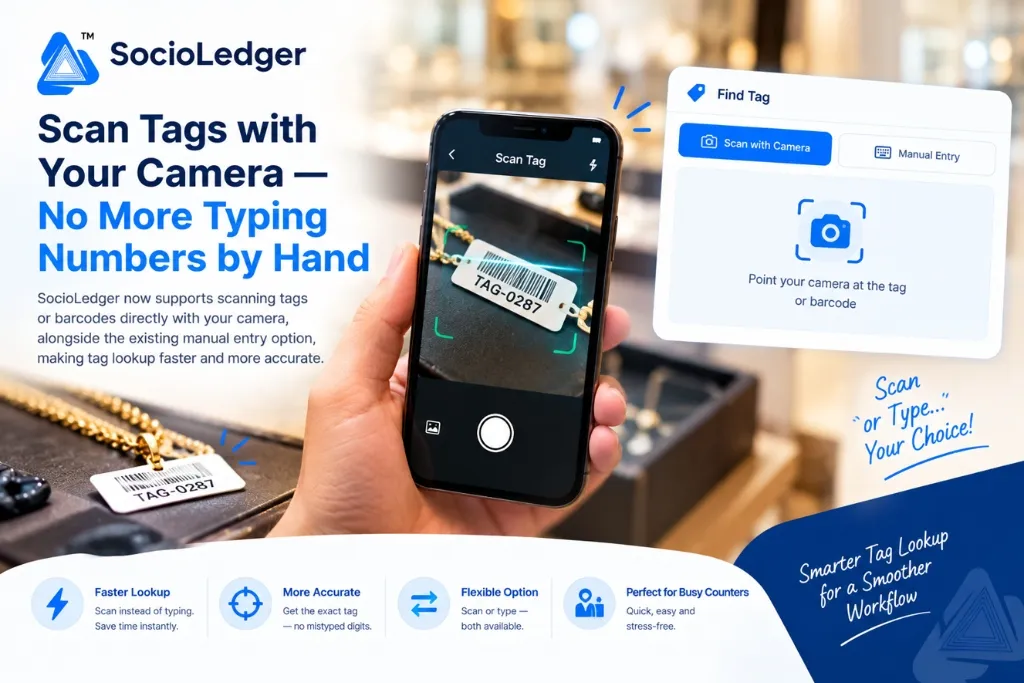
Table of contents
Open Table of contents
- The bottleneck of manual tag entry in busy jewelry stores
- Hidden operational costs of typing tag numbers by hand
- What’s new: Instant camera scanning alongside manual entry
- Key benefits of camera tag lookup for jewelry businesses
- How it works: scan or type in two simple steps
- Manual typing vs. camera barcode scanning: side-by-side comparison
- Part of SocioLedger’s complete jewelry tag ecosystem
- Two ways to get there, same destination
The bottleneck of manual tag entry in busy jewelry stores
In high-volume jewelry hubs like Zaveri Bazaar, Karol Bagh, Surat, and Manek Chowk, counter staff and inventory managers interact with hundreds of product tags every day. Whether you are conducting a routine showroom inventory check, pulling up product specs for an interested walk-in customer, or processing wholesale dispatches, locating individual tags is a continuous, high-frequency task.
Traditionally, looking up a tag in jewelry software meant one thing: manually typing out the entire tag number on a keyboard.
While manual typing gets the job done, it introduces persistent friction into daily showroom routines:
- Slow data entry: Typing a 6 to 10-character alphanumeric tag code requires several seconds of focused typing for every single item.
- High risk of typos: On a crowded counter with waiting customers, an operator can easily switch adjacent digits or miss a character, pulling up an unrelated piece or returning an empty search result.
- Broken customer engagement: Sales staff have to shift their attention away from the customer to peer at a tiny tag label and type carefully on a keyboard or terminal.
When you multiply those lost seconds and mistyped queries across dozens of items handled throughout a busy retail shift, manual tag lookup becomes an unnecessary drain on counter productivity.
Software should remove friction from counter sales, not force your staff into tedious typing drills.
Hidden operational costs of typing tag numbers by hand
Relying exclusively on manual character entry creates subtle bottlenecks across your showroom floor and back-office inventory desks.
1. Slower checkout and consultation speed
During major shopping rushes such as Dhanteras, Akshaya Tritiya, or peak wedding seasons, counter velocity is vital. If a sales associate needs to pull up specifications, purity records, or making charges for multiple gold chains, diamond rings, and bridal sets, manually typing each tag code adds minutes to the interaction, causing queues to build up at billing counters.
2. Misidentification and pricing discrepancies
Jewelry inventories contain closely numbered tags representing items of vastly different purities, diamond clarities, and metal weights. A single mistyped digit can accidentally pull up a 22K bangle record instead of an 18K piece, leading to incorrect quotes, inaccurate invoice billing, or confusing discrepancies during evening tally reconciliations.
3. Sales associate fatigue and fragmented focus
Counter associates deliver the highest conversion rates when they can maintain engaging, eye-to-eye conversations with customers. Constantly pausing to squint at tiny printed barcode stickers and enter alphanumeric strings disrupts sales momentum and exhausts counter staff over long retail shifts.
4. Hardware constraints and clutter
Traditional barcode scanning setups frequently require dedicated handheld USB or Bluetooth laser scanners. These devices add clutter to compact display counters, require battery charging or cable routing, and often malfunction when dropped or disconnected.
Equipping any camera-enabled device with direct scanning intelligence eliminates these limitations entirely.
What’s new: Instant camera scanning alongside manual entry
SocioLedger introduces direct camera-based barcode and tag scanning across every tag lookup interface in the platform.
You can now use your smartphone, tablet, laptop, or desktop webcam to scan physical jewelry tags and barcodes directly into the system — with zero typing required.
Crucially, camera scanning works side by side with manual entry:
- Scan with Camera: Point your device’s built-in camera at the tag or barcode to read the code instantly and pull up the item record.
- Manual Entry: Type the tag number manually whenever you prefer, preserving complete flexibility for edge cases.
You do not have to pick one permanent method or configure complicated hardware settings. Both options are available on screen simultaneously, allowing your staff to choose whichever approach best fits the situation at hand.
Key benefits of camera tag lookup for jewelry businesses
Bringing native camera scanning into everyday store workflows delivers immediate operational advantages:
- Faster than typing — Scanning a tag takes a fraction of the time needed to type an alphanumeric code by hand, pulling up item specifications in milliseconds.
- Fewer errors — The camera scanner reads the exact printed barcode directly, preventing transposed digits, misplaced prefixes, and wrong-item selections.
- Flexibility, not replacement — Manual entry remains fully accessible for situations where scanning is difficult, such as an old faded tag, a damaged barcode sticker, or a piece stored behind glass.
- Smoother on a busy counter — When you are moving quickly with customers waiting, pointing a camera is much simpler and faster than carefully typing out long codes.
- Zero extra hardware costs — Works immediately using the camera already built into your smartphone, tablet, or laptop, without needing external scanning guns.
How it works: scan or type in two simple steps
Using the new camera scanning capability is simple and intuitive, requiring no learning curve for your counter team.
Here is how the streamlined lookup workflow operates:
- Open tag lookup and choose your method — Whenever you open a tag search modal or lookup field, you will see the Scan with Camera and Manual Entry tabs side by side.
- For scanning — Select Scan with Camera, point your camera at the tag or barcode sticker, and the system instantly recognizes the code and loads the product details.
- For manual entry — Switch to Manual Entry to type the tag number in as you always could.
- Instant result — Either way, you land on the exact same tag record — pulled up instantly with full purity details, gross weight, net weight, stone breakdown, and pricing.
The entire process happens within your standard web browser window, delivering immediate feedback the moment a barcode enters the camera frame.
Manual typing vs. camera barcode scanning: side-by-side comparison
Here is how camera-based tag scanning compares to traditional manual data entry:
| Operational Factor | Traditional Manual Typing | SocioLedger Camera Tag Scanning |
|---|---|---|
| Lookup Speed | 5–10 seconds per item | Under 1 second (instant optical detection) |
| Data Accuracy | Subject to human typing and typo errors | 100% accurate barcode reading |
| Counter Hardware | Requires keyboard or handheld scanner | Uses existing phone, tablet, or webcam |
| Handling Damaged Tags | Standard fallback method | Seamless fallback to manual input tab |
| Multi-Item Verifications | Tedious during large tray audits | Rapid point-and-scan sequence |
| Staff Training | Requires careful keyboard entry | Zero training needed — point and shoot |
Providing dual input methods ensures maximum throughput without sacrificing reliability.
Part of SocioLedger’s complete jewelry tag ecosystem
Camera tag scanning integrates seamlessly with SocioLedger’s end-to-end jewelry inventory and tracking capabilities:
- Instant Creation: Pair faster lookups with our 1-click Save & Create Tag button to generate new tags without extra form-fill steps.
- Wholesale Intake: Streamline supplier intake and inventory tagging using wholesaler tag barcode on purchase.
- Full Traceability: Track every scanned item back to its origin with jewelry tag history ERP traceability.
- Accidental Deletion Protection: Safeguard your tagged inventory using the tag delete confirmation setting.
- Exhibition Stock Tally: Speed up on-site booth audits at trade events like IIJS with offline stock tally.
Every improvement in SocioLedger connects smoothly to give your team complete control over your stock lifecycle.
Two ways to get there, same destination
Not every moment on the showroom floor calls for the exact same approach. Sometimes pointing a camera is three times faster; other times, typing a quick three-digit number is more practical.
By offering both camera scanning and manual entry side by side, this update makes tag lookup significantly faster without taking away the flexibility jewelers already rely on. Your staff can work faster, eliminate mistyped errors, and keep customer interactions running smoothly.
Want camera scanning added to another specific screen or custom workflow in the platform? Tell us — contact our team and let us know how we can make your jewelry operations even smoother.