
SocioLedger’s WhatsApp Automation setting lets you automatically send printouts and confirmation messages to WhatsApp the exact moment an entry is created across Retail, Transaction, Repair, and other core modules. Every entry created on your platform — a retail sale invoice, a payment transaction, or a repair job slip — often needs to reach someone beyond the computer screen where it was logged. Traditionally, that meant manually opening the record, clicking to generate a PDF or message, and sending it across yourself every single time. By automating this process, your entries notify the right recipients immediately without requiring any extra clicks from your counter staff.
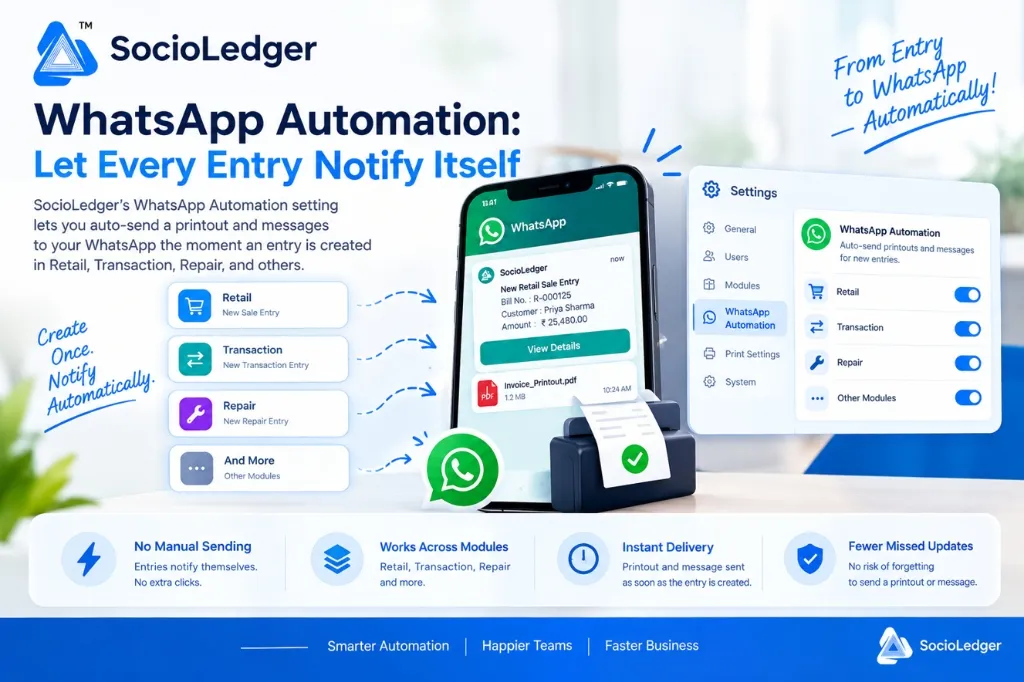
Table of contents
Open Table of contents
- The friction of manual document sending in jewelry operations
- Hidden costs of manual follow-ups at the billing counter
- What is SocioLedger WhatsApp Automation?
- How it works: create once, notify automatically
- Key benefits for jewelry showrooms and wholesalers
- Manual document sharing vs. SocioLedger WhatsApp Automation
- Part of SocioLedger’s complete WhatsApp integration ecosystem
- Automation that works quietly in the background
The friction of manual document sending in jewelry operations
In high-pace jewelry trading hubs like Zaveri Bazaar, Karol Bagh, Surat, and Manek Chowk, store staff and billing operators handle dozens of customer interactions every hour. During peak shopping festivals like Dhanteras, Akshaya Tritiya, or the wedding season, counters stay crowded with customers buying gold jewelry, making advance payments, or dropping off heirloom ornaments for polishing and repair.
Every transaction requires immediate communication:
- Retail sales: The customer or business owner needs a digital copy of the tax invoice or estimate slip.
- Financial transactions: Parties expect instant confirmation when cash, bank transfers, or gold metal receipts are booked.
- Repair jobs: Customers want immediate intake receipts with weight details and job card references when handing over jewelry.
In conventional systems, sending these updates is a disconnected, manual chore. After filling out and saving an entry, the billing operator has to:
- Locate the saved record in the system.
- Click to generate the printout or export a PDF invoice.
- Open WhatsApp Web or a messaging app.
- Search for the recipient’s phone number, attach the document, and click send.
While doing this once or twice is manageable, repeating these steps for every single entry throughout a busy workday creates substantial friction.
Hidden costs of manual follow-ups at the billing counter
Relying on counter staff to manually dispatch every printout and message introduces operational bottlenecks that hurt customer satisfaction and internal coordination.
1. Slower checkout lines during rush hours
When counter staff must manually forward every invoice or payment confirmation, counter queues slow down. Losing 30 to 45 seconds per transaction to generate and send messages adds up to hours of delays across a single showroom shift.
2. Forgotten messages and missed updates
During busy evening shifts, billing operators prioritize ringing up the next customer over sending out digital slips. As a result, sending printouts gets deferred until closing time — or forgotten entirely. Customers leave wondering if their payment was recorded, and store owners lack immediate visibility into daily counter transactions.
3. Workflow inconsistency across different departments
Retail billing, cashier desks, and repair counters often operate independently. When each department follows a different procedure for sharing receipts, customer communication becomes erratic. Some customers receive immediate digital PDFs on WhatsApp, while others receive nothing at all.
4. Excessive administrative distraction
Counter staff should stay focused on delivering great customer experiences, answering product questions, and finalizing sales — not performing repetitive file downloads and manual messaging tasks.
Automating these notifications eliminates manual overhead completely.
What is SocioLedger WhatsApp Automation?
SocioLedger introduces a centralized WhatsApp Automation setting that enables seamless, trigger-based messaging across your entire jewelry business.
Located directly inside your Settings menu, this feature allows administrators to enable automated WhatsApp delivery on a module-by-module basis:
- Retail: Automatically sends tax invoices, sales estimates, and digital receipts the instant a retail bill is saved.
- Transaction: Dispatches real-time payment vouchers, receipts, and ledger credit/debit alerts immediately after booking cash, bank, or metal entries.
- Repair: Instantly delivers repair job intake slips, weight confirmations, and tracking links to customers the moment a piece is booked for service.
- Other Modules: Extends automated messaging to wholesale dispatches, order bookings, and inventory transfers.
Once enabled for a module, the system handles the entire communication pipeline automatically in the background.
How it works: create once, notify automatically
Using WhatsApp Automation requires zero changes to how your staff performs daily data entry.
Here is the simple workflow:
- Enable WhatsApp Automation in Settings: Navigate to Settings > WhatsApp Automation and toggle on automation for your desired modules (Retail, Transaction, Repair, and others).
- Create entries as usual: Your billing operators and store managers enter sales bills, payment vouchers, or repair jobs exactly as they always do.
- Automatic real-time delivery: The moment the entry is saved, SocioLedger instantly generates the formatted message and PDF printout, sending it directly to the configured WhatsApp number.
There are no extra buttons to click, no external messaging windows to open, and no delays.
Key benefits for jewelry showrooms and wholesalers
SocioLedger’s WhatsApp Automation delivers practical, day-to-day advantages across your entire store workflow:
- No manual sending — Entries notify themselves. Once turned on, there is nothing extra to click after saving an entry.
- Consistent across modules — Operates uniformly across Retail, Transaction, Repair, and other supported areas, eliminating fragmented departmental procedures.
- Instant delivery — Printouts and messages go out the exact second an entry is saved, rather than whenever someone finds time to send them manually.
- Fewer missed updates — Because notification is triggered automatically by system saves, there is zero risk of staff forgetting to forward a printout after a busy day.
- Dual format support — Seamlessly dispatches formatted text summaries alongside downloadable PDF invoices and receipts.
Manual document sharing vs. SocioLedger WhatsApp Automation
Here is how automated WhatsApp notifications compare to traditional manual workflows:
| Workflow Factor | Traditional Manual Process | SocioLedger WhatsApp Automation |
|---|---|---|
| Trigger Action | Manual PDF generation, search, attach, and send | 100% automated on entry save |
| Time per Entry | 30–60 seconds of operator effort | 0 seconds (instant background trigger) |
| Delivery Speed | Delayed until staff has free time | Immediate real-time delivery |
| Error / Miss Rate | High during peak festival rushes | Zero missed notifications |
| Cross-Module Standard | Inconsistent across departments | Uniform across Retail, Transaction, & Repair |
| Staff Focus | Burdened with repetitive messaging tasks | Fully focused on sales and customer service |
Part of SocioLedger’s complete WhatsApp integration ecosystem
WhatsApp Automation works seamlessly with SocioLedger’s broader suite of WhatsApp-powered tools for jewelry businesses:
- Unified Communication: Discover how to turn WhatsApp into part of your jewelry ERP to streamline end-to-end customer and supplier dialogues.
- Contact Sharing: Rapidly distribute client details across your sales network with customer contacts WhatsApp sharing.
- Lead Capture: Collect customer requirements and design references directly using the WhatsApp widget file upload for leads.
- Business Tracking: Monitor sales pipelines and inquiry statuses with WhatsApp Business ERP integration to track leads.
Automation that works quietly in the background
The best kind of automation is the one you never have to think about. Once WhatsApp Automation is switched on, every entry you create takes care of its own notification — so your team can stay focused on serving the next customer or finishing the next job instead of worrying about manual follow-up steps.
Want WhatsApp automation added for another specific module or custom workflow? Tell us — contact our team and let us know how we can make your jewelry management even easier.