
Wastage represents a core part of what an ornament costs you. When your showroom sales executive or wholesale manager picks up a piece to quote a price, negotiate with a buyer, or evaluate inventory against replacement bullion rates, the purchase wastage percentage is a critical baseline number. If that metric lives strictly inside the ERP database, staff must scan the barcode or open a terminal every time they need to check it. SocioLedger’s new Show purchase wastage on Tag print setting resolves this hurdle by printing the exact purchase wastage directly onto physical jewelry tags.
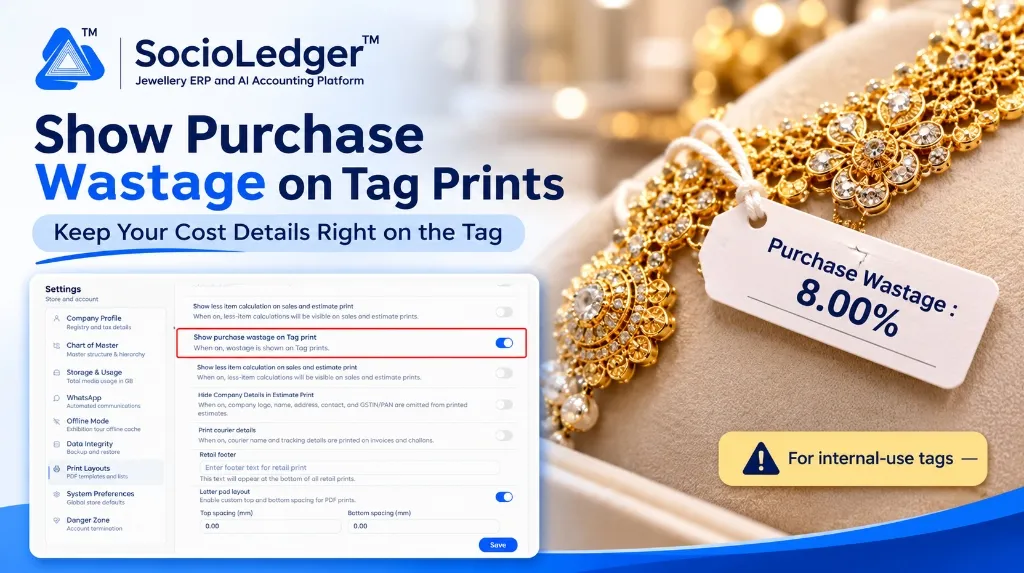
Table of contents
Open Table of contents
- The cost visibility gap on the showroom floor
- What’s new: The Show Purchase Wastage on Tag Print setting
- Important guideline: Internal use vs. customer-facing tags
- Comparing counter workflows
- Why this matters for jewelry businesses
- Feature comparison
- How it works: Step-by-step setup guide
- Where to find the setting
- Part of SocioLedger’s jewelry inventory suite
- Cost details where your team needs them
The cost visibility gap on the showroom floor
In active jewelry trading hubs like Zaveri Bazaar in Mumbai, Surat’s bullion exchanges, Rajkot, and Karol Bagh in Delhi, pricing conversations move fast. Wholesale buyers and retail clients frequently negotiate making charges, gross-to-net deductions, and overall margins across display trays.
When sales executives quote prices, knowing the exact manufacturing or purchase wastage (e.g., 8.00% or 12.50%) that went into procuring the piece determines the lowest margin threshold they can safely offer:
- Terminal dependency: Staff had to walk to a counter PC or pick up a barcode scanner just to look up purchase parameters.
- Negotiation pauses: Pausing a live customer discussion to search an ERP tag history slows down sales tempo and dampens buying momentum.
- Inconsistent pricing discipline: Without instant cost reference, junior counter staff risk giving excessive discounts or underestimating procurement expenses.
- Inventory review delays: During internal physical audits or supplier appraisal reviews, comparing batches required pulling digital records piece by piece.
When cost metrics travel directly with the ornament, your team quotes with confidence and speed.
What’s new: The Show Purchase Wastage on Tag Print setting
Located in Settings → Print Layouts, the new Show purchase wastage on Tag print toggle adds the recorded purchase wastage percentage straight to your printed jewelry labels.
Once enabled, every printed tag displays the verified wastage rate alongside weight and item specs:
+-------------------------------------------------------------+
|  SOCIOLEDGER JEWELS                         [ Barcode ]     |
|  22KT Gold Choker Necklace                                  |
|  Gross Wt: 48.520 g   Net Wt: 46.100 g                      |
|-------------------------------------------------------------|
|  Purchase Wastage: 8.00%                                    |
+-------------------------------------------------------------+
Your overall label layout remains completely customizable. Whether you print on standard thermal jewelry dumbell tags (such as 100mm x 15mm), synthetic butterfly labels, or barcode folded tags, the setting integrates the wastage figure neatly without disrupting your barcode or purity markers.
Important guideline: Internal use vs. customer-facing tags
Because purchase wastage directly reflects your cost structure, displaying it openly requires thoughtful consideration based on your retail environment:
We recommend turning this setting on in scenarios such as:
- Wholesale and B2B Showrooms: Where buyers and sales executives negotiate directly based on benchmark wastage and bullion rates.
- Internal Trays and Vault Tags: Where tags are handled exclusively by store managers, auditors, and counter teams.
- Manufacturing and Job Work Tracking: When routing finished jewelry batches between casting workshops, karigars, and branch distribution hubs.
For customer-facing retail display tags where confidentiality is paramount, you can simply keep the toggle turned off.
Comparing counter workflows
+-----------------------------------------------------------------------------+
|             Traditional Workflow: Terminal Lookup for Cost Wastage          |
+-----------------------------------------------------------------------------+
|                                                                             |
|   [ Customer Inspects Necklace ] ──► [ Requests Custom Rate / Discount ]    |
|                                            │                                |
|                                            ▼                                |
|                        [ Sales Staff Takes Piece to Counter PC ]            |
|                                            │                                |
|                                            ▼                                |
|                        [ Scans Barcode & Searches Tag History ]             |
|                                            │                                |
|                                            ▼                                |
|                        [ Checks Purchase Wastage % in Database ]            |
|                                            │                                |
|                                            ▼                                |
|                        [ Returns to Customer to Negotiate Price ]           |
|                                                                             |
|   Result: Interrupted sales flow, lost momentum, desk dependency            |
+-----------------------------------------------------------------------------+
|            SocioLedger Workflow: Instant Wastage Reference on Tag           |
+-----------------------------------------------------------------------------+
|                                                                             |
|   [ Customer Inspects Necklace ] ──► [ Requests Custom Rate / Discount ]    |
|                                            │                                |
|                                            ▼                                |
|                        [ Staff Glances Directly at Tag Print ]              |
|                        [ "Purchase Wastage: 8.00%" Visible ]                |
|                                            │                                |
|                                            ▼                                |
|                        [ Instantly Calculates Safe Margin Floor ]           |
|                                            │                                |
|                                            ▼                                |
|                        [ Closes Sale on the Spot Without Leaving ]          |
|                                                                             |
|   Result: Seamless conversation, zero delays, protected profit margins      |
+-----------------------------------------------------------------------------+
Why this matters for jewelry businesses
Printing purchase wastage on tags delivers measurable advantages across operations:
- Immediate cost reference: No scanning or system navigation required — the number is right on the tag in your hand.
- Faster customer negotiation: Empower counter staff to calculate accurate quotes and firm discount floors on the spot.
- Accelerated stock audits: Review procurement margins and metal categories quickly while inspecting showroom trays.
- Compatible with existing layouts: Preserves your chosen tag dimensions (e.g., 100mm x 15mm) and existing barcode settings.
- Full administrative control: Easily enabled for internal trays and B2B batches, or disabled for retail displays.
Feature comparison
| Operational Capability | Traditional Tag Printing | SocioLedger Wastage on Tag Print |
|---|---|---|
| Wastage Visibility | Hidden inside database records | Printed directly on the physical label |
| Quote Preparation | Requires PC lookup or barcode scan | Instant glance on the ornament tag |
| Tag Format Impact | Requires complex custom template edits | 1-click toggle compatible with all sizes |
| Negotiation Agility | Pauses conversations to check margins | Continuous, confident counter discussions |
| Stock Valuations | Pulls reports across hundreds of tags | Immediate piece-by-piece cost verification |
| Confidentiality Options | All-or-nothing labeling | Flexible setting toggled whenever needed |
How it works: Step-by-step setup guide
Enabling purchase wastage on your tag prints takes less than a minute:
- Open Settings: Log in to SocioLedger and select Settings from the navigation menu.
- Access Print Layouts: Navigate to Print Layouts in the sidebar.
- Turn on Show Purchase Wastage: Locate Show purchase wastage on Tag print and toggle the switch to On.
- Save Configuration: Click Save at the bottom of the screen.
- Print Tags: Generate tag prints using your standard tag layout (such as 100mm x 15mm) — the purchase wastage appears clearly on each label.
Where to find the setting
- Go to Settings → Print Layouts → Show purchase wastage on Tag print.
It resides alongside other print layout controls, including less-item calculation on sales prints, courier details on invoices, estimate print formatting, and retail footer notes.
Part of SocioLedger’s jewelry inventory suite
The purchase wastage tag print setting works in coordination with SocioLedger’s comprehensive suite of tools built for modern jewelry retailers, wholesalers, and manufacturers:
- Track tag lifecycle: Review creation dates and piece turnover with Tag Age and Created Date on Scan.
- Prevent accidental stock deletion: Safeguard active tags using Tag Delete Confirmation.
- Trace physical stock movements: Reconcile daily display trays with Stock Tally Daily Verification.
- Log courier shipments: Print carrier credentials automatically using Print Courier Details.
- Inspect ledger transactions: Audit party balances and metal accounts with Ledger History Panel.
Cost details where your team needs them
The best operational information is the data that is right in front of you the moment you need to make a decision. By putting purchase wastage on physical tags, jewelry businesses give their sales executives and inventory teams immediate cost clarity while retaining complete control over when and where to show it.
Want another parameter or barcode detail added to your tag layouts? Tell us — contact our team and we will be delighted to tailor your print templates to your exact specifications.