
A tag’s gross weight is rarely all metal. In gold, silver, and diamond jewelry, stones, beads, synthetic crystals, pearls, and enamel are routinely deducted as less weight to calculate the true net metal weight. Those deductions have a value of their own: an acquisition cost paid when you purchased or manufactured the piece, and a retail price charged when you sell it to a customer. Until now, finding that value meant digging through old purchase vouchers and sales registers. SocioLedger’s Tag History now brings the purchase total and sale total for less weight items straight to the same screen as the tag.
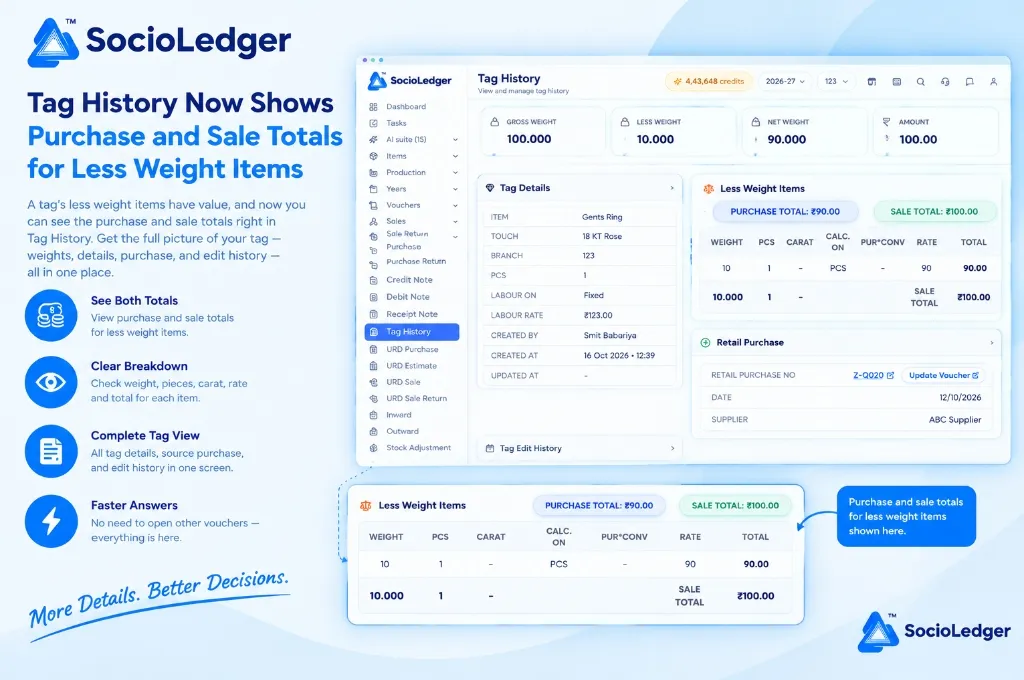
Table of contents
Open Table of contents
- Why less weight deductions need monetary visibility
- What’s new in Tag History: Purchase and sale totals
- The complete tag story: What else is in Tag History
- Why this matters for jewelry businesses
- Comparison: Traditional tag records vs. SocioLedger Tag History
- How it works: Step-by-step tag inspection
- Where to find purchase and sale totals in Tag History
- Part of SocioLedger’s integrated jewelry tagging suite
- The whole value of a tag, not just the metal
Why less weight deductions need monetary visibility
In busy jewelry manufacturing and trading hubs like Zaveri Bazaar in Mumbai, Surat, Rajkot, and Karol Bagh in Delhi, calculating gross-to-net weight is a continuous, hourly task. When studded bangles, kundan necklaces, or solitaire rings are weighed at the intake or sales counter, deductions are applied immediately:
- Stone deductions: Precious gemstones, semi-precious beads, and cubic zirconia deducted to determine fine metal content.
- Accessory additions: Enamel (meenakari), wax fillings (lakh), threads (dori), or clasps.
- Weight classification: Accurate recording of gross weight, deducted less weight, and final net metal weight.
In traditional software, less weight is treated as a flat numerical deduction — a single metric like 10.000 g. That weight deduction reduces the metal value, but it completely obscures the commercial value of the deducted materials:
- Hidden cost basis: A 10-gram deduction could represent inexpensive synthetic beads or thousands of rupees in calibrated natural stones. Knowing only the weight leaves counter staff in the dark about actual acquisition costs.
- Fragmented voucher searches: When a wholesale partner or retail buyer questions the stone markup or asks for a breakdown, staff must leave the tag record, look up the original purchase bill, locate the voucher line, and do manual math on a calculator.
- Unclear margins during counter negotiations: Without immediate visibility over both purchase cost and retail selling price for stones, sales executives risk underquoting custom studded pieces or overpaying on trade-ins.
- Delayed customer answers: Waiting for a supervisor to check back-office purchase books slows down counter service during peak showroom hours.
Your jewelry software should show you the complete financial anatomy of an ornament, not just its metal weight.
+-----------------------------------------------------------------------------+
|              Traditional Voucher-Digging Workflow (Before)                  |
+-----------------------------------------------------------------------------+
|                                                                             |
|   Buyer or Counter Staff Inquires About Less Weight Deductions              |
|            │                                                                |
|            ├──► Open Tag Screen ──► See Only Flat Weight (e.g. 10.000 g)    |
|            ├──► Where is the cost? ──► Navigate to Purchase Module          |
|            ├──► Search Purchase Voucher (Z-Q020) ──► Inspect Vendor Invoice |
|            ├──► Where is the selling markup? ──► Pull Separate Price Sheet  |
|            └──► Calculate Itemized Stone Margins on Desk Calculator         |
|                                                                             |
|   Result: 5–10 minutes lost, fragmented records, delayed counter response   |
+-----------------------------------------------------------------------------+
|              SocioLedger Unified Tag History Workflow (Now)                 |
+-----------------------------------------------------------------------------+
|                                                                             |
|   Buyer or Counter Staff Inquires About Less Weight Deductions              |
|            │                                                                |
|            └──► Open [ Tag History ] & Enter Tag Number                     |
|                 │                                                           |
|                 ├── Summary Cards: Gross (100g), Less (10g), Net (90g)      |
|                 ├── Tag Details: Item, 18 KT Rose, Karigar, Labour rate     |
|                 ├── Less Weight Items:                                      |
|                 │   ├── [ PURCHASE TOTAL: ₹90.00 ]                          |
|                 │   ├── [ SALE TOTAL: ₹100.00 ]                             |
|                 │   └── Breakdown Table: Weight, Pcs, Carat, Rate & Total   |
|                 └── Source Purchase (Z-Q020) & Edit History on One Screen   |
|                                                                             |
|   Result: Complete deduction valuation and margins available in seconds     |
+-----------------------------------------------------------------------------+
What’s new in Tag History: Purchase and sale totals
In the Tag History module, the Less Weight Items section now displays the purchase total and the sale total side by side directly above the itemized deduction table.
At the top of the Less Weight Items card, two distinct badges provide instant clarity:
- Purchase Total: Highlights the total cost of all deducted items on the purchase side (for example,
PURCHASE TOTAL: ₹90.00). - Sale Total: Displays the corresponding total billed to the client on the sale side (for example,
SALE TOTAL: ₹100.00).
Below the summary badges, an itemized table breaks down every single component deducted from the piece:
- Weight: The physical weight deducted for that specific stone or component.
- Pieces (PCS): The individual count of stones or additions.
- Carat: The gemological carat rating when applicable.
- Calculated On (CALC. ON): The billing basis used for the rate — whether calculated per piece (PCS), per gram, or per carat.
- Rate: The applied unit rate.
- Total: The final calculated monetary value.
The table concludes with a dedicated Sale Total summary row, showing exactly how the final sale value is derived. Jewelers can verify rates, examine calculation methods, and confirm profitability without ever leaving the tag screen.
+-------------------------------------------------------------------------------------------------------+
|  Tag History > View and manage tag history                                       [ 4,43,648 credits ] |
+-------------------------------------------------------------------------------------------------------+
|                                                                                                       |
|  ┌──────────────────┐  ┌──────────────────┐  ┌──────────────────┐  ┌──────────────────┐               |
|  │ ⚖️ GROSS WEIGHT  │  │ ⚖️ LESS WEIGHT   │  │ ⚖️ NET WEIGHT    │  │ 🪙 AMOUNT        │               |
|  │ 100.000          │  │ 10.000           │  │ 90.000           │  │ 100.00           │               |
|  └──────────────────┘  └──────────────────┘  └──────────────────┘  └──────────────────┘               |
|                                                                                                       |
|  ┌───────────────────────────────────────────────┐ ┌─────────────────────────────────────────────────┐|
|  │ 💎 Tag Details                              > │ │ ⚖️ Less Weight Items                             │|
|  ├───────────────────────────────────────────────┤ ├─────────────────────────────────────────────────┤|
|  │ ITEM           Gents Ring                     │ │ [ PURCHASE TOTAL: ₹90.00 ] [ SALE TOTAL: ₹100.00]│|
|  │ TOUCH          18 KT Rose                     │ │                                                 │|
|  │ BRANCH         123                            │ │ WEIGHT   PCS   CARAT   CALC. ON   RATE    TOTAL     │|
|  │ PCS            1                              │ │ ─────────────────────────────────────────────── │|
|  │ LABOUR ON      Fixed                          │ │ 10       1     -       PCS        90      90.00     │|
|  │ LABOUR RATE    ₹123.00                        │ │ ─────────────────────────────────────────────── │|
|  │ CREATED BY     Smit Babariya                  │ │ 10.000   1     -       SALE TOTAL     ₹100.00   │|
|  │ CREATED AT     16 Oct 2026 • 12:39            │ └─────────────────────────────────────────────────┘|
|  │ UPDATED AT     -                              │ ┌─────────────────────────────────────────────────┐|
|  └───────────────────────────────────────────────┘ │ ⊕ Retail Purchase                             > │|
|  ┌───────────────────────────────────────────────┐ ├─────────────────────────────────────────────────┤|
|  │ 📅 Tag Edit History                         > │ │ RETAIL PURCHASE NO  Z-Q020 [Update Voucher ↗]   │|
|  └───────────────────────────────────────────────┘ │ DATE                12/10/2026                  │|
|                                                    │ SUPPLIER            ABC Supplier                │|
|                                                    └─────────────────────────────────────────────────┘|
+-------------------------------------------------------------------------------------------------------+
The complete tag story: What else is in Tag History
Tag History serves as the single source of truth for every ornament in your inventory. Instead of scattering details across purchase records, tagging logs, and voucher ledgers, everything sits on one screen:
1. Weights and valuation summary
Four high-level metrics are pinned across the top of the page for immediate reference:
- Gross Weight: The total weight of the finished piece on the scale (e.g.,
100.000 g). - Less Weight: The aggregate weight deducted for stones, beads, and findings (e.g.,
10.000 g). - Net Weight: The pure metal weight remaining after deductions (e.g.,
90.000 g). - Amount: The baseline valuation or tagged selling price of the piece.
2. Tag Details
The Tag Details card provides complete structural metadata about the piece:
- Item: The catalog product name (such as Gents Ring, Kada, or Choker).
- Touch: The purity standard (such as 18 KT Rose, 22 KT 916, or Fine 999).
- Branch: The physical store branch or warehouse currently holding the stock.
- Pieces: The quantity of items represented by this tag.
- Labour Basis & Rate: The making charge calculation method (Fixed, Per Gram, or Percentage) and the configured labor rate (e.g.,
₹123.00). - Audit Metadata: Who created the tag, the exact creation timestamp, and when the record was last modified.
3. Retail Purchase origin
Every tag originates from an intake event. The Retail Purchase section connects the tag directly back to its source:
- Voucher Number: The purchase voucher code (e.g.,
Z-Q020). - Date & Supplier: The acquisition date and the vendor or karigar who supplied the ornament.
- Update Voucher Shortcut: A direct link that opens the original purchase entry, allowing authorized managers to verify supplier bills without navigating through the purchase register.
4. Tag Edit History
Jewelry specifications can evolve as pieces are resized, polished, or repaired. The Tag Edit History panel records every adjustment made over the life of the tag, providing a tamper-proof audit trail for showroom managers and auditors.
Why this matters for jewelry businesses
Bringing purchase and sale totals for less weight items into Tag History delivers practical advantages across showroom floors and back offices.
1. See the monetary value of every deduction
Deductions are no longer anonymous weight subtractions. Jewelers can see exactly how much capital is tied up in stones, findings, and decorative components on every tagged piece.
2. Purchase and sale side by side
Comparing acquisition cost with selling price in adjacent badges gives immediate visibility over stone markups. Showroom owners can protect gross margins without consulting confidential price books.
3. Granular breakdown by weight, pieces, and rate
Whether stones are billed per carat, per piece, or per gram, the itemized table explains exactly how totals were calculated. There is zero ambiguity about rate structures or quantity counts.
4. Everything about a tag in one place
Weights, purity touches, labor calculations, supplier vouchers, less weight valuations, and edit histories sit side by side on a unified screen. Teams no longer need to keep multiple browser tabs open to answer basic inventory questions.
5. Quicker answers for clients and staff
When a customer at the counter asks why two rings of identical net weight have different price tags, sales staff can point to the less weight breakdown and explain the stone quality and valuation with confidence.
Comparison: Traditional tag records vs. SocioLedger Tag History
| Operational Dimension | Traditional Jewelry ERP Tag Screens | SocioLedger Tag History with Less Weight Totals |
|---|---|---|
| Less Weight Visibility | Shows only flat deducted weight (grams) | Shows weight, pieces, rate, purchase & sale value |
| Margin Verification | Requires manual cross-referencing with vouchers | Purchase Total and Sale Total shown side by side |
| Calculation Basis | Hidden or aggregated into gross amounts | Itemized basis (per piece, per gram, per carat) |
| Source Purchase Tracing | Requires searching the purchase invoice register | Direct voucher link and supplier details on page |
| Audit & Edit Trail | Disjointed system logs or missing history | Built-in Tag Edit History tracking all changes |
| Counter Response Speed | 5 to 10 minutes of voucher digging | Instant answers available on a single screen |
How it works: Step-by-step tag inspection
Inspecting a tag’s complete breakdown in SocioLedger is simple and intuitive:
- Open Tag History: Navigate to Tag History in the left sidebar menu and enter or scan the tag number.
- Review summary cards: Inspect the top cards for gross weight, less weight, net weight, and total amount.
- Examine Less Weight Totals: Check the Purchase Total and Sale Total badges displayed prominently in the Less Weight Items panel.
- Inspect the deduction table: Review individual items for piece count, carats, billing calculation basis, rate, and total line amounts.
- Trace the source voucher: Scroll to the Retail Purchase section to see supplier details or click Update Voucher to view the original bill.
Where to find purchase and sale totals in Tag History
The purchase total and sale total badges appear directly inside the Less Weight Items section on the Tag History screen, positioned on the right-hand side adjacent to the Tag Details card.
Because the figures are integrated directly into the standard Tag History dashboard, your staff can access them during routine inventory lookups without altering existing counter workflows.
Part of SocioLedger’s integrated jewelry tagging suite
Tag History works alongside SocioLedger’s comprehensive collection of jewelry inventory and tagging tools:
- Enrich tags after creation: Add studio reference photos, collections, and categories to existing stock with Tag Media.
- Automated tag generation: Pre-configure automated naming and numbering rules with Tag by Item settings.
- Fast camera scanning: Use any tablet or mobile device camera to scan barcodes instantly with camera scan tag barcode.
- Inter-branch transfers: Dispatch and verify tagged stock between showroom locations using branch transfer tags between branches.
- Instant tag creation: Generate tags directly from purchase entries with the Save & Create Tag button.
The whole value of a tag, not just the metal
Net weight tells you how much fine metal an ornament holds, but a jewelry piece is more than its bullion content. Diamonds, color stones, pearls, and craftsmanship all contribute to its true worth. With purchase and sale totals for less weight items, Tag History provides jewelers with a complete, transparent view of that value on a single screen.
Want another detail added to Tag History? Tell us — contact our team and we’ll look into it.